
Webhooks
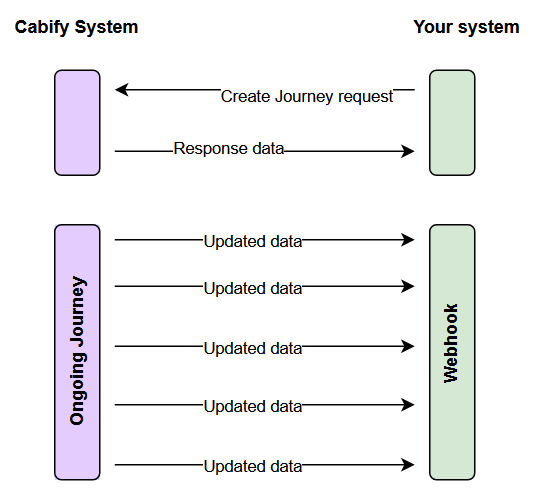
A webhook is an endpoint on your side where Cabify will post results of asynchronous tasks as well as the update of Journey's State
Admin users set it themselves in the Integrations section of the Cabify web app: open the menu of the integration you want to change, choose Webhook and save the URL of your endpoint. Production and testing each have their own webhook, so set the one that matches the credentials you are using. Clearing the field stops the updates. Changes take effect within seconds.
Duplicated eventsIt is possible that you receive duplicated events, we highly recommend validate it on your system to discard them
For most state updates, you can use
journey_id+stateas a deduplication key. Forhot-hiredevents, you may receive multiple updates for the same journey by design as information is enriched — always useevent_dateto keep the latest event.
journey_id+stateis not enough forhire, because a single journey legitimately reaches that state more than once and for different reasons (searching, driver preassigned, assigned driver unassigned). Includeevent_dateanddriver_idin the key forhire, or you will discard the event that tells you the journey lost its driver. See Journey State Updates for what eachhirevariant carries.Duplicates also come from our retries: if your endpoint does not answer within 5 seconds we retry the same event up to 3 more times. Because those retries are spread over several seconds, a retry of an older event can arrive after a newer one, so order by
event_daterather than by arrival order. To avoid this entirely, answer with a2xx(for example202 Accepted) as soon as you receive the call and do the processing asynchronously.Creating a new journey after a previous journey was cancelled or finished is allowed. Duplicate validation applies to webhook event delivery (e.g. same
journey_idandstate), not to the creation of new journeys.
Updated 20 days ago