
Journey States
State names
This section describes the States received in the field name of the State query. To view the states received through webhooks please review that section.
All possible state names are depicted in the following state machine diagram.
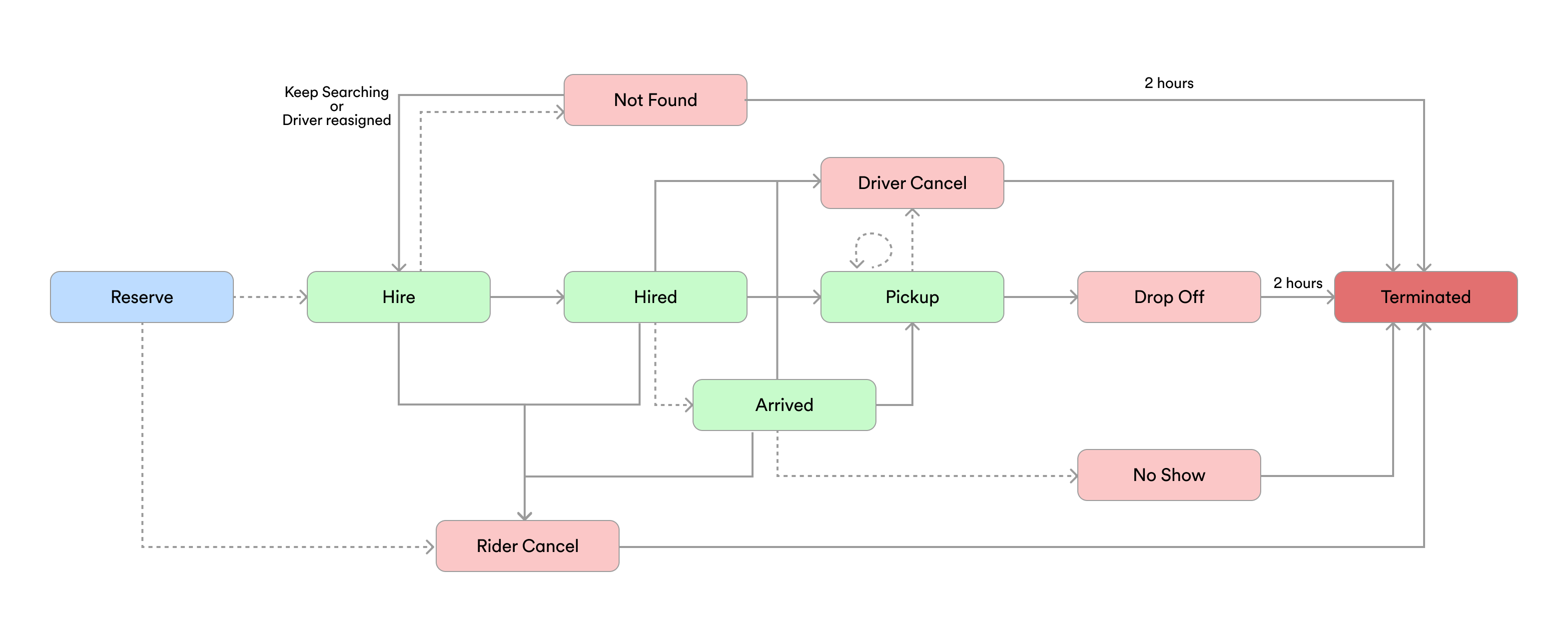
Notes:
- A pointed line indicates an optional transition. Therefore there can be journeys which do not have this kind of transitions
- Pick up state occurs when the rider is inside the car heading towards destination. This state can transition into itself meaning that if you're polling on the State query you'll get the same state.name but with different properties e.g. position or driver. If you're subscribed via webhooks please take a look here
- Reserve state only happens on Reserved journeys
- All end states (
drop off,rider cancel,driver cancel,no show,not found) transition toterminated. - States marked in light red cause Journey.endState to change from null to an actual endState. In this sense you can consider a journey finished in this point, but take into account that at this point there is no sale generated yet.
- Not Found if you receive this state it means there was no driver found for your current journey request. It will take several minutes to fulfill journey's endState.
- Rider Cancel is triggered via the riderCancel mutation.
State descriptions:
| Name | Description |
|---|---|
| hire | Cabify is looking for an available driver. |
| hired | The driver has been assigned and is on the way to the point of origin. We start sending Location events. Note: There is no separate "route start" event. For reservations, the driver may be assigned long before start_at (e.g. when the journey is created); the first hired event indicates assignment, not necessarily the moment the driver physically starts driving. |
| rider cancel | End State: rider canceled the ride |
| driver cancel | End State: driver canceled the ride |
| no show | End State: the rider hasn’t shown up |
| not found | No available driver was found before the search time limit. This primarily occurs for ASAP journeys, but can also happen for reservations (though it is unusual, as we have automatic and manual internal systems to prevent reservations from being without a driver). |
| arrived | The driver has arrived at a stop and is waiting. For single-stop journeys this is the pickup point. For multi-stop journeys you will receive an arrived event at every stop (first pickup and all intermediate stops). This state is skipped if the driver did not have to wait at all. |
| pick up | A passenger action occurred at a stop and the vehicle is moving towards the next destination. You may receive multiple pick up events in a journey — one per stop. In multi-stop journeys, check the stop_action field to distinguish between pickups and dropoffs. Rider cancellation is no longer possible once the first pick up event has occurred. |
| drop off | End State: The rider reached the destination and left the vehicle. The journey finished successfully. |
| terminated | End State: Triggered automatically 2 hours after reaching an end state in production (10 minutes in sandbox environment). A Sale associated with this journey is generated at this moment. This event contains the same information as the previous 'finished' event, and its main purpose is to indicate that the invoice is being generated. |
| unknown | A default state when the api receives a state it does not understand from upstream. Clients should ignore these events and let us know if they are breaking any flow. |
| "" / null | the journey is not over yet |
End StateJourney's endState field tells you the way a Journey ended once it is in the terminated state (otherwise it will return null).
Stop polling once a journey reaches an end stateThe states marked as End State in the table above (
drop off/finished,rider cancel,driver cancel,no show,not found,terminated) are terminal, the journey will never transition to another state.Once you receive any end state (via webhook or a poll response), stop calling
GET /journey/:id/statefor that journey. Continued polling is unnecessary: the endpoint will keep returning200withstate: terminated, and the journey's live data has been archived.For reliable state delivery without polling, configure Journey State Updates webhooks.
Regarding reservations
Reservations emit at least 2 hire events; the first one will be sent as soon as we receive the reservation request and it is just a form of acknowledgment by the event system. It can be safely ignored as it is the exact same as receiving a 200 when requesting the creation of the journey. The second one will be received when the system starts looking for drivers for the journey. This will happen sometime before the time set in the reservation to take into account the time it takes to find a driver and the travel time.
Driver assignment for reservations: Unlike ASAP journeys, reservations typically have a driver preassigned when the journey is created. If 15 minutes before the start_at time the assigned driver cannot reach the rider, the system automatically searches for alternative drivers. You will receive hired events when drivers are assigned or reassigned. In rare cases where no driver can be found despite our automatic and manual internal systems, you may receive a not found event.
Event delivery: We always send not found and driver cancel events when they occur. There is no time window where we withhold these events or where you should ignore them; process every event you receive.
Preassigned driver
preassigned_driver is the driver preassigned to a journey, typically for a reservation, before a driver is officially assigned. When present, you can show it to the rider in advance.
{
  "journey_id": "f0397896-19aa-11ed-b6fe-7aaea8067492",
  "name": "hire",
  "preassigned_driver": {
    "id": "e8417e8cd14c11ec869eb2e3f32e3b38",
    "name": "Diana",
    "avatar_url": "https://secure.gravatar.com/avatar/675ee8c314586d36a7b33c6c773565e9?r=pg&s=80&=blank"
  }
}
Notes:
- It contains only
id,nameandavatar_url.nameis the driver's first name only, it does not include the surname. Unlikedriver, it intentionally does not include the phone number: the preassigned driver is not yet confirmed for the journey, so they should not be contacted (this avoids calls to a driver who may never end up performing it). - It is informative and may change or disappear before the journey starts (for example if the system reassigns the driver). Do not assume the preassigned driver is the one that will end up performing the journey.
- While a driver is only preassigned the state stays
hire; having apreassigned_driverdoes not by itself move the journey tohired. driveralways takes precedence overpreassigned_driver. Once a driver is assigned,driveris the authoritative driver performing the journey andpreassigned_driverbecomes purely informative (it tells you who had been preassigned, which may or may not be the same person). When both are present, always rely ondriver.
Failed journeys
These are the common scenarios that cause a journey to not be successful. We are not showing the Public Info Updated or Location Update events, but they are still being generated as soon as the journey reaches the hire and hired states respectively.
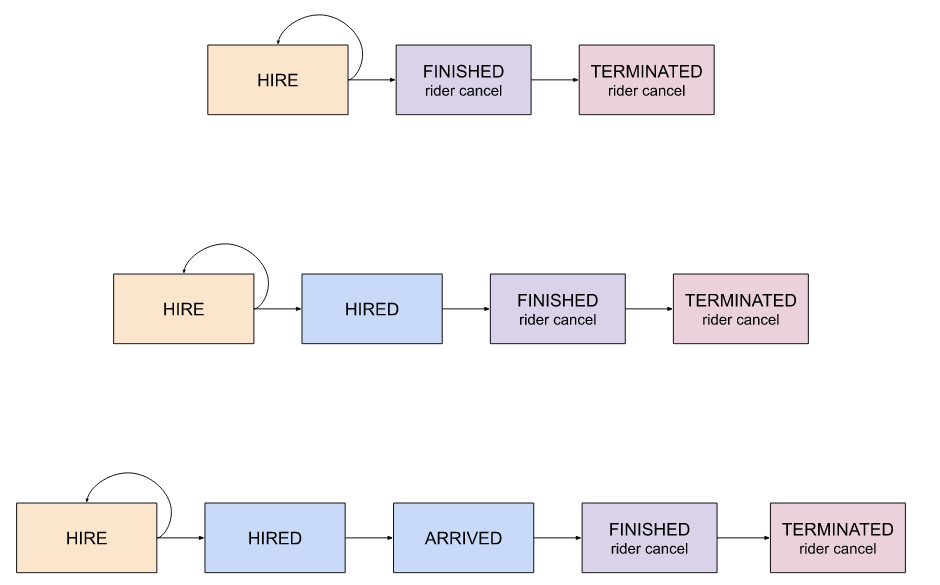
Rider canceled the journey
This flow occurs when the journey is canceled from the client's side via app or "riderCancel" mutation. The client can cancel a journey while it is in hire, hired, or arrived state (before the first pick up), although canceling a journey when a driver has already been assigned may incur a cost.
Multi-stop journeys: In multi-stop journeys, you will receivearrivedevents at every stop (not just the first pickup). However, rider cancellation is only allowed before the firstpick up. Once a passenger has been picked up, the journey cannot be cancelled — even if subsequentarrivedevents are received for later stops. A cancel attempt after the firstpick upwill return a409 Conflictresponse:{ "message": "can't cancel journey at current state" }
Driver canceled the journey
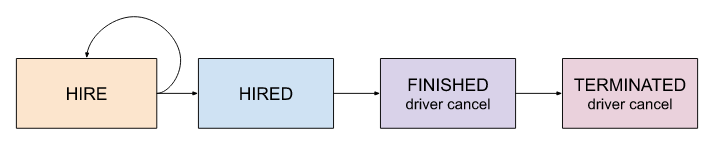
A driver may cancel a journey for a number of reasons (usually he accepted the journey by mistake). This will not incur any cost to the client.
Rider did not show up
At the first pick-up stop: When the driver arrives at the pick-up point and the rider does not appear after the courtesy time (usually 5 minutes free of charge plus another 5 minutes not free of charge), the journey ends. You will receive a finished event with finish_reason: "no show". Charges may occur for the extra waited time; prices depend on the chosen product and the courtesy time may vary by driver agency.
At an intermediate stop (multi-stop journeys): If a rider does not show up at an intermediate stop, the driver can mark it as no show. The vehicle then resumes towards the next stop, which is communicated as a pick up event; check that rider's entry in stop_contacts — their stop_action will be null. The system removes the remaining stops for that rider, but the journey continues for other riders.

Updated 3 months ago