
Sandbox Environment
This environment is your pre-production or sandbox to try out the capabilities of our API and to test the integration with your pre production environment(s):
Do not use real dataWe highly recommend not using real data in the sandbox environment.
Different environments, different dataThe production and testing environments are independent: each one manages its own journeys, users and data, so records you create in one are not visible in the other.
Getting Started with Sandbox
When you create a sandbox API key, we automatically generate your sandbox account with the same user who generated the key from production. This means you can immediately start testing with your existing user credentials.
Accessing the Enterprise Web App
To access the sandbox enterprise web app at https://cabify-sandbox.com/app, you have two options:
-
Reset your password: Use the "Forgot Password" feature on the login page to reset your password and gain access to the enterprise app.
-
Create additional users: You can use your sandbox API key to add new users programmatically. These users will need to either:
- Reset their password to access the enterprise app, or
- Follow the activation email they receive to set up their account
Credentials and identifiers per environment
Each environment has its own integration, with its own OAuth UUID and Secret that you generate in the Integrations section. Because the OAuth UUID is also the key we use to sign webhooks, the signing key is different in each environment: when you move to production, update your endpoint with the OAuth UUID of the production integration, or signature verification will fail.
Your Cabify account identifier is a different thing. It is the client_id we send in the X-CABIFY-CLIENT-ID header and in data.client_id, it identifies your account rather than your integration, and it does not change when you generate or regenerate keys. If your endpoint compares that header against a configured value, read the value from data.client_id of an event instead of assuming it — see Webhook Headers.
API endpoint
This URL is your testing environment basePath:
- Web-app: https://cabify-sandbox.com/app
- Get Token: https://cabify-sandbox.com/auth/api/authorization
- Ride Hailing: https://cabify-sandbox.com/api/v4
- Logistics: https://logistics.api.cabify-sandbox.com
Simulated drivers
In order to make the testing environment as similar to production as possible, we have developed a service with the sole purpose to simulate the behaviour of drivers, moving around the city and picking up the journeys near them.
Once the driver is assigned to a journey, it will take some time for the driver to arrive to the pick-up location (you can see it real time in the web app). The moment it does, the rider will receive an SMS with a link to share the journey (it directs to the web app and allows anyone with the link to see the journey in real time). Lastly, the driver will drive to the destination and drop off the rider.
ImportantOnly in the testing environment the simulated drivers are configured to operate in the center of Madrid, so to test the journeys they must be made with origin only in the following area: https://www.google.com.ar/maps/@40.4361263,-3.7013768,16z
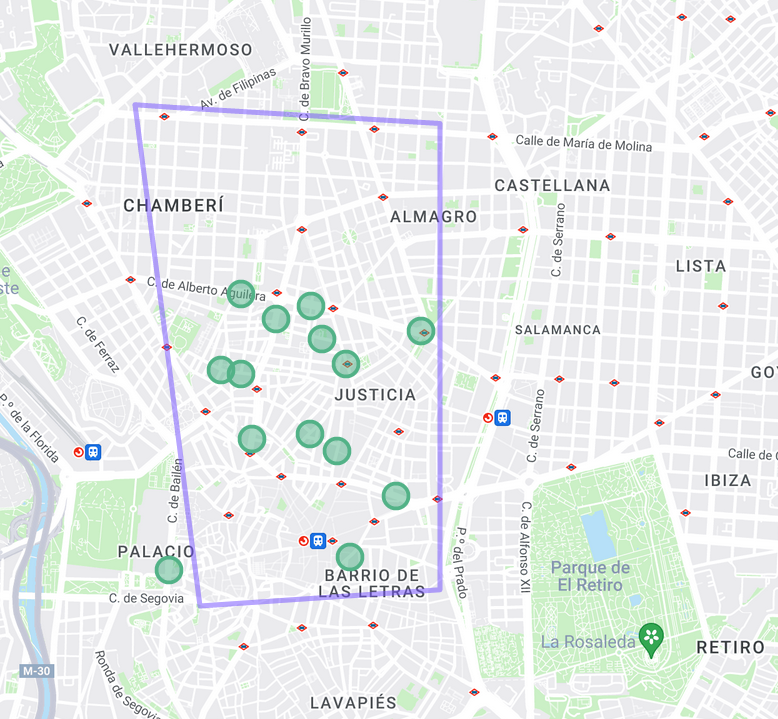
The simulation zone is defined by the following polygon:
| Point | Latitude | Longitude |
|---|---|---|
| 1 | 40.439693 | -3.715771 |
| 2 | 40.413493 | -3.711308 |
| 3 | 40.414342 | -3.694828 |
| 4 | 40.438713 | -3.694828 |
It is important to note that the number of drivers in the environment is limited and if a journey is not picked up by a driver for a certain amount of time, it will time out. This is normal behaviour and can happen in production when there is a surge in the number of journeys being created (sudden heavy rain, a concert just ended, etc). This is a transient issue and creating a new journey usually fixes it.
Updated 14 days ago