
Introduction
This REST API is the starting point for the Logistics service. Using this API you will be able to:
- Create the packages you want to deliver. We call it parcels.
- Mark the parcels as ready to send. Be ready, a driver will appear soon to fetch the parcels!
- Track the status and the position of your parcels at every moment.
- Once the parcel is delivered, you will be able to fetch the proof of delivery.
URLs
Sandbox
URL: https://logistics.api.cabify-sandbox.com/
DMS: https://logistics.cabifty-sandbox.com/
For testing purposes. Please check Sandbox documentation
Production
URL: https://logistics.api.cabify.com/
DMS: https://logistics.cabify.com/
API Status: https://status.cabify.tech/
Definition
There are two ways to test this API using embedded definition or you can get here the Open API definition
Basic concepts
Parcel
It's the package you need to send. It's a unit, identified by a unique code that includes a pick-up and a drop-off (destination) point.
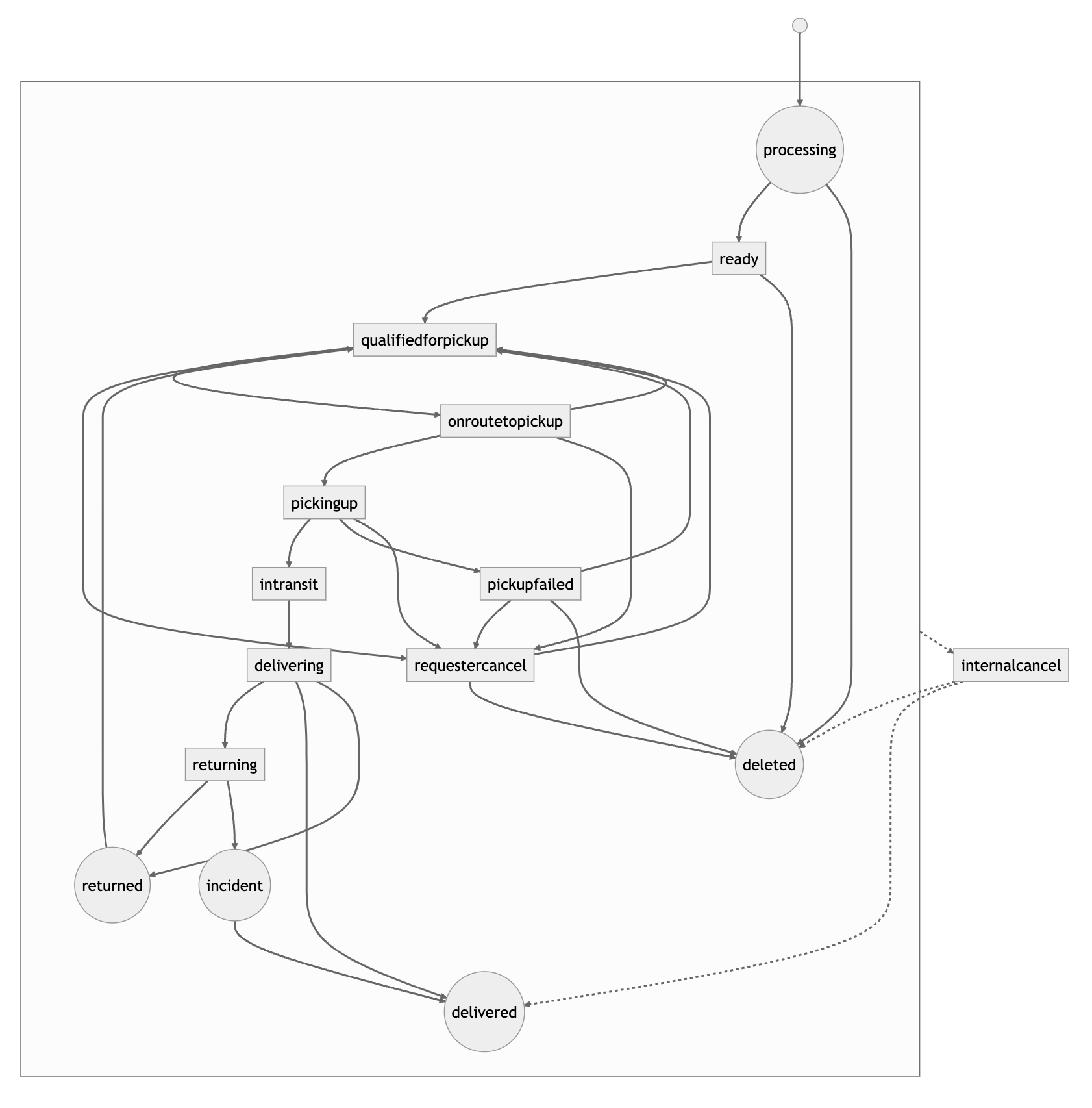
During the delivery, the parcel will change its state. This is the list of the different states the parcel could have:
- ready: The parcel has been created.
- qualifiedforpickup: Once deliver has been claimed, system is looking for a driver to start the delivery.
- onroutetopickup: The delivery has started, and a driver is going to the pick-up point.
- pickingup: The driver has arrived at the pick-up point and is ready to pick up the parcel.
- intransit: The parcel is in the vehicle.
- delivering: The driver has arrived at the drop-off point and is ready for delivery.
- delivered: The parcel has been successfully delivered.
- undelivered: The delivery has failed.
- onroutetoreturn: The delivery has failed, and the driver is on route to the pick-up point for returning the parcel.
- returning: The driver has arrived at the return point, and is returning the parcel.
- returned: The recipient was not found and the parcel has been returned successfully.
- incident: There was an incident during the returning process.
- requestercancel: The requester has canceled the delivery.
- internalcancel: The delivery has been canceled.
- pickupfailed: It wasn't possible to pick up the parcel.
- deleted: The parcel has been deleted.
Parcels' state machine
API operations
Parcels
- Add new parcels to the system
- Update a parcel by ID
- Search parcels filtering by different fields.
- Get parcel by ID
- Delete parcels by IDs
Delivery
Status
Webhooks
You can receive real-time information every time a parcel changes its state. The payload received will be the same as Status of the given parcel
To do that, you need to subscribe to the parcel updates webhook. You can manage your subscription using these endpoints.
- Subscribe to the parcels updates
- Fetch the current webhooks subscriptions
- Delete webhook subscriptions
There are two kinds of hooks:
- parcel. You will receive every change on the status of the parcel.
- parcelLocation. From
onroutetopickupto the final state, you will receive the driver's position every 5 seconds.
Users
Get information about the users of your account.